---
title: Completing a reservation
description: How to complete a reservation at the end of a shift.
---
[Skip to content](https://avvail.com/support/steps-to-complete-a-reservation-0#main-content)
English
Show submenu for translations

Open main navigation
Close main navigation
- English
Show submenu for translations
- Contact us
Contact us
How can we help you?
- There are no suggestions because the search field is empty.
1. [Restaurant Resource Center](https://avvail.com/support?hsLang=en)
2. [Managing Reservations](https://avvail.com/support/managing-reservations?hsLang=en)
# Completing a reservation
## Avvail reservation are auto-completed at 3AM local time, so be sure to mark no-shows and party size changes each night.
As of April 2026, reservations are now auto-completed at the end of each shift. To ensure that you are credited for every guest that shows up at your restaurant, it is important to mark any no-shows or party size changes in your Avvail dashboard before 3AM local time, when the reservations are completed and locked.
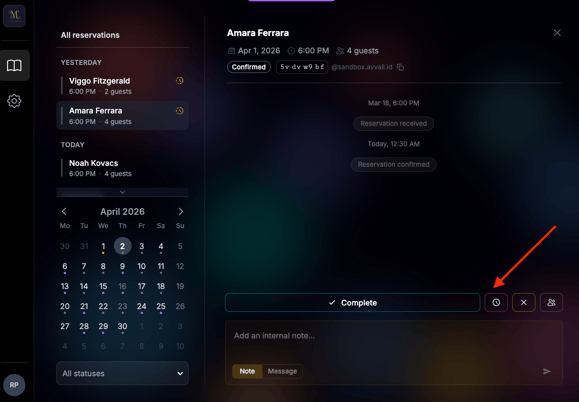
#### HOW TO NO-SHOW
##### 1. Click into the reservation you would like to no-show.
You can do this on the Notifications side of the screen or the All Reservations side.
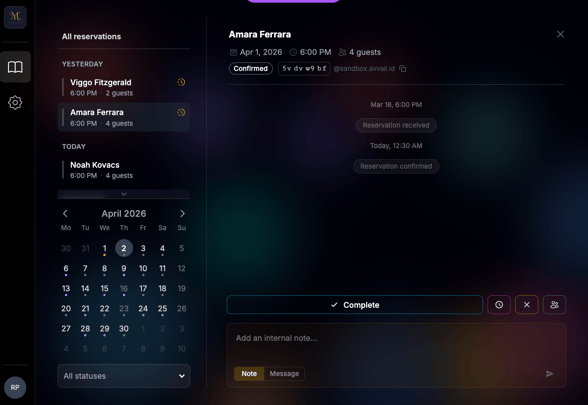
##### 2. Click the red button to no-show the guests.
For more information on our policy around no-shows, refer to this [support article](https://avvail.com/support/what-happens-if-a-party-no-shows-0?hsLang=en).
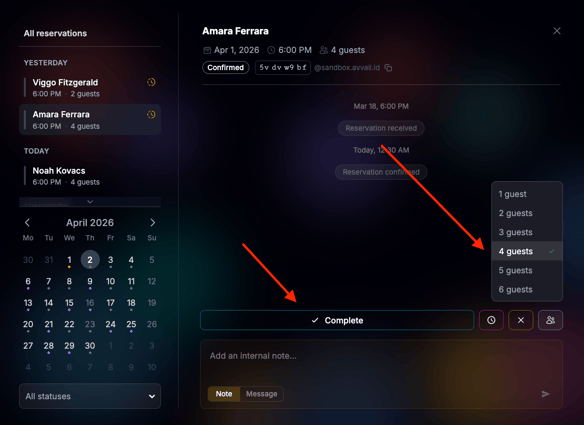
#### HOW TO ADJUST PARTY SIZE
##### 1. Click into the reservation you would like to adjust the party size for.
You can do this on the Notifications side of the screen or the All Reservations side.
##### 2. Click the button with the people icon and select the number of guests that arrived.
For more information on our policy around changes to party size, refer to this [support article](https://avvail.com/support/are-we-required-to-accommodate-extra-guests?hsLang=en).
NOTE: Please do not mark the reservation as canceled unless the guest cancels the reservation directly with your team. Most cancellations will be handled through Avvail and you will be notified via email and in your Avvail dashboard.
- [Account Settings](https://avvail.com/support/account-settings?hsLang=en)
- [Managing Reservations](https://avvail.com/support/managing-reservations?hsLang=en)
- [Reporting](https://avvail.com/support/reporting?hsLang=en)
- [TMS Setup](https://avvail.com/support/tms-setup?hsLang=en#main-content)
- [OpenTable](https://avvail.com/support/tms-setup?hsLang=en#opentable)
- [Resy](https://avvail.com/support/tms-setup?hsLang=en#resy)
- [SevenRooms](https://avvail.com/support/tms-setup?hsLang=en#sevenrooms)
- [FAQs](https://avvail.com/support/faqs?hsLang=en#main-content)
- [Terms of Agreement](https://avvail.com/support/faqs?hsLang=en#terms-of-agreement)
- [Cancellations & No Shows](https://avvail.com/support/faqs?hsLang=en#cancellations-no-shows)
[](https://avvail.com?hsLang=en)
[mailto:email@email.com](mailto:email@email.com)
Copyright © 2025, Guest.Tech