---
title: Managing cancellations
description: How to process canceled reservations.
---
[Skip to content](https://avvail.com/support/managing-canceled-reservations-0#main-content)
English
Show submenu for translations

Open main navigation
Close main navigation
- English
Show submenu for translations
- Contact us
Contact us
How can we help you?
- There are no suggestions because the search field is empty.
1. [Restaurant Resource Center](https://avvail.com/support?hsLang=en)
2. [Managing Reservations](https://avvail.com/support/managing-reservations?hsLang=en)
# Managing cancellations
## Reservations canceled through Avvail will need to be removed from your TMS.
When a reservation is canceled by a guest through Avvail, you will be notified via email and the cancellation will appear in your dashboard.
#### STEPS TO ACKNOWLEDGE A CANCELED RESERVATION
##### 1. Remove the canceled reservation from your TMS.
After you’re notified of a cancellation from Avvail in the Daily Reservation Summary email, or you see a canceled reservation in the [Reservations](https://dashboard.avvail.com/reservations) tab of your dashboard, remove that reservation from your TMS if you have already entered it.
As of April 2026, all reservations removed from your TMS will be automatically acknowledged by our system. However, if this feature is not in service, follow these steps.
##### 2. Acknowledge the cancellation by clicking on the canceled reservation and selecting "Accept Cancellation."
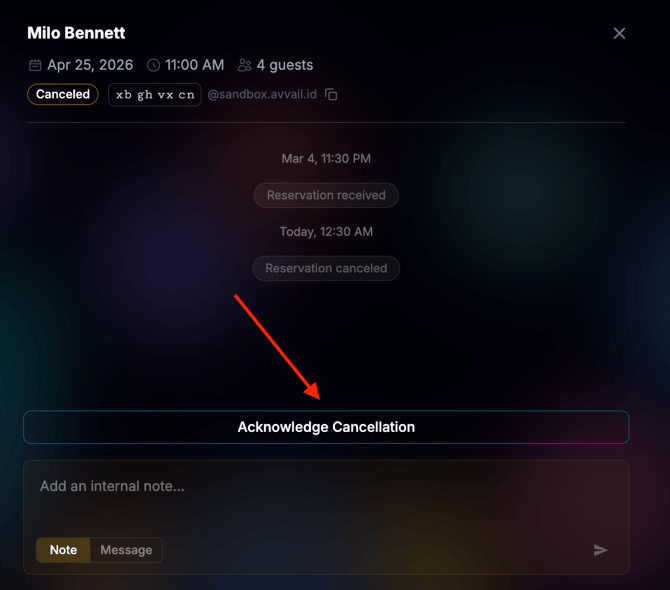
NOTE: There is a different process for reservations that are canceled by the guest directly through your restaurant via phone, email, or another method. For more information on how to handle these types of canceled reservations, refer to this [support article](https://avvail.com/support/what-if-a-guest-cancels-directly-with-us-rather-than-through-avvail?hsLang=en).
- [Account Settings](https://avvail.com/support/account-settings?hsLang=en)
- [Managing Reservations](https://avvail.com/support/managing-reservations?hsLang=en)
- [Reporting](https://avvail.com/support/reporting?hsLang=en)
- [TMS Setup](https://avvail.com/support/tms-setup?hsLang=en#main-content)
- [OpenTable](https://avvail.com/support/tms-setup?hsLang=en#opentable)
- [Resy](https://avvail.com/support/tms-setup?hsLang=en#resy)
- [SevenRooms](https://avvail.com/support/tms-setup?hsLang=en#sevenrooms)
- [FAQs](https://avvail.com/support/faqs?hsLang=en#main-content)
- [Terms of Agreement](https://avvail.com/support/faqs?hsLang=en#terms-of-agreement)
- [Cancellations & No Shows](https://avvail.com/support/faqs?hsLang=en#cancellations-no-shows)
[](https://avvail.com?hsLang=en)
[mailto:email@email.com](mailto:email@email.com)
Copyright © 2025, Guest.Tech