
When a reservation is canceled by a guest through Avvail, you will be notified via email and the cancellation will appear in your dashboard. Through clicking the check mark to acknowledge that the reservation is removed from your TMS, we can confirm that you are aware of the cancellation.
STEPS TO ACKNOWLEDGE A CANCELED RESERVATION
1. Remove the canceled reservation from your TMS.
After you’re notified of a cancellation from Avvail in the Daily Reservation Summary email, or you see a canceled reservation in the Incoming Reservations tab of your dashboard, remove that reservation from your TMS if you have already entered it.
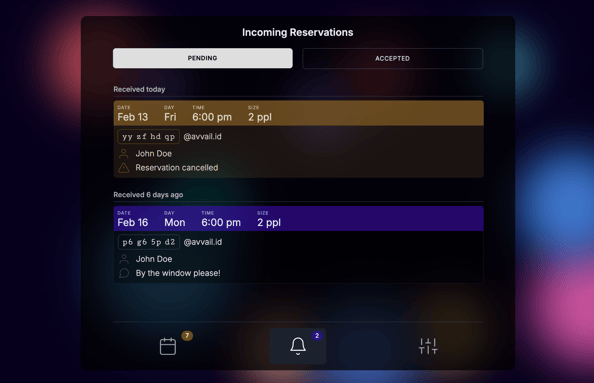
NOTE: Canceled reservations will have a brown banner and have a note that says "Reservation canceled," while new pending reservations will have a blue banner.
2. Acknowledge the cancellation by clicking the "check mark" next to the pending canceled reservation.
NOTE: There is a different process for reservations that are canceled by the guest directly through your restaurant via phone, email, or another method. For more information on how to handle these types of canceled reservations, refer to this support article.