
1. Daily Summary Emails
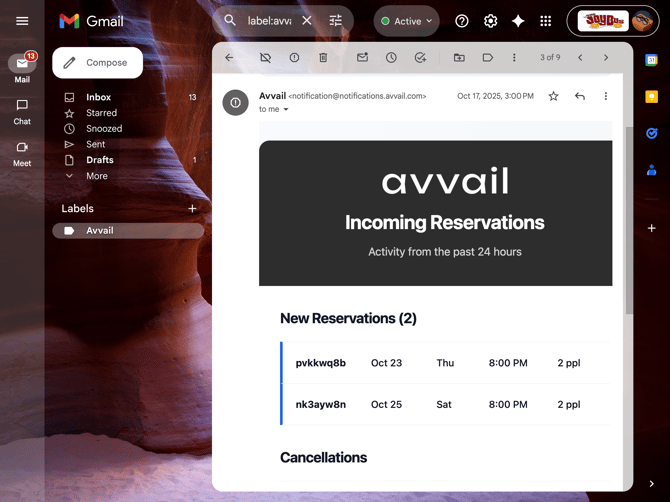
Each day at 3:00 PM in the restaurant’s local time zone, Avvail sends a summary email to each configured contact. This email is only sent if at least one new or canceled reservation has been received within the previous 24 hours.
The daily email displays a summary of new and canceled reservations received in the last 24 hours, including guest name, reservation time, party size, and reservation status.
2. Dashboard Incoming Reservations Tab
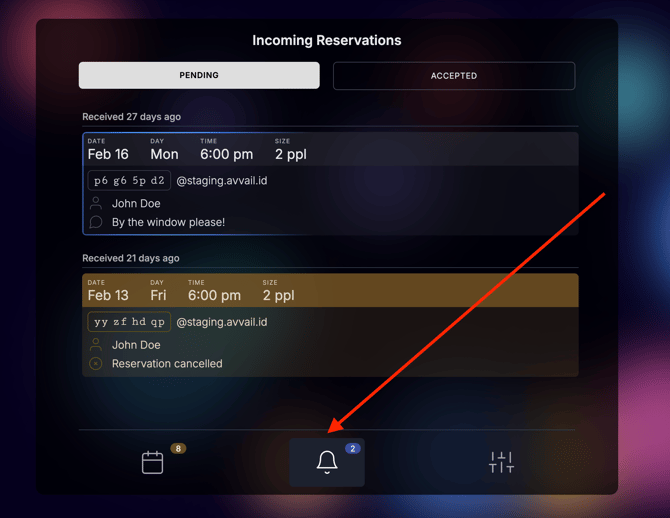
Once logged in, you can navigate to the Incoming Reservations tab of your dashboard to view your incoming reservations. This page also provides a real-time view of all reservation activity, including pending, accepted, canceled, and completed reservations. Users can review details, monitor changes, and manage reservations directly from the dashboard.
Canceled reservations will appear with a brown banner, while new reservations will be neutral.
For information on how to accept pending reservations, refer to this support article.