
When adding Avvail reservations to Resy, you will need to create a guest profile for Avvail using our contact information and book reservations on behalf of the guest. This removes the need to include a unique phone number for the guest and allows you to trace Avvail reservations easily.
STEPS TO USE "BOOK ON BEHALF OF"
1. Add Avvail to your Guest Book.
For specific guidance, refer to this support article.
2. Open the Booking Module and enter the reservation details.
Select the date, party size, time, and table type.
3. Search for and select the Avvail profile on the right side of the screen, click the three dots, and select "Book on Behalf Of."
4. Type the Avvail guest's name to appear on the reservation and select “Create Guest.”
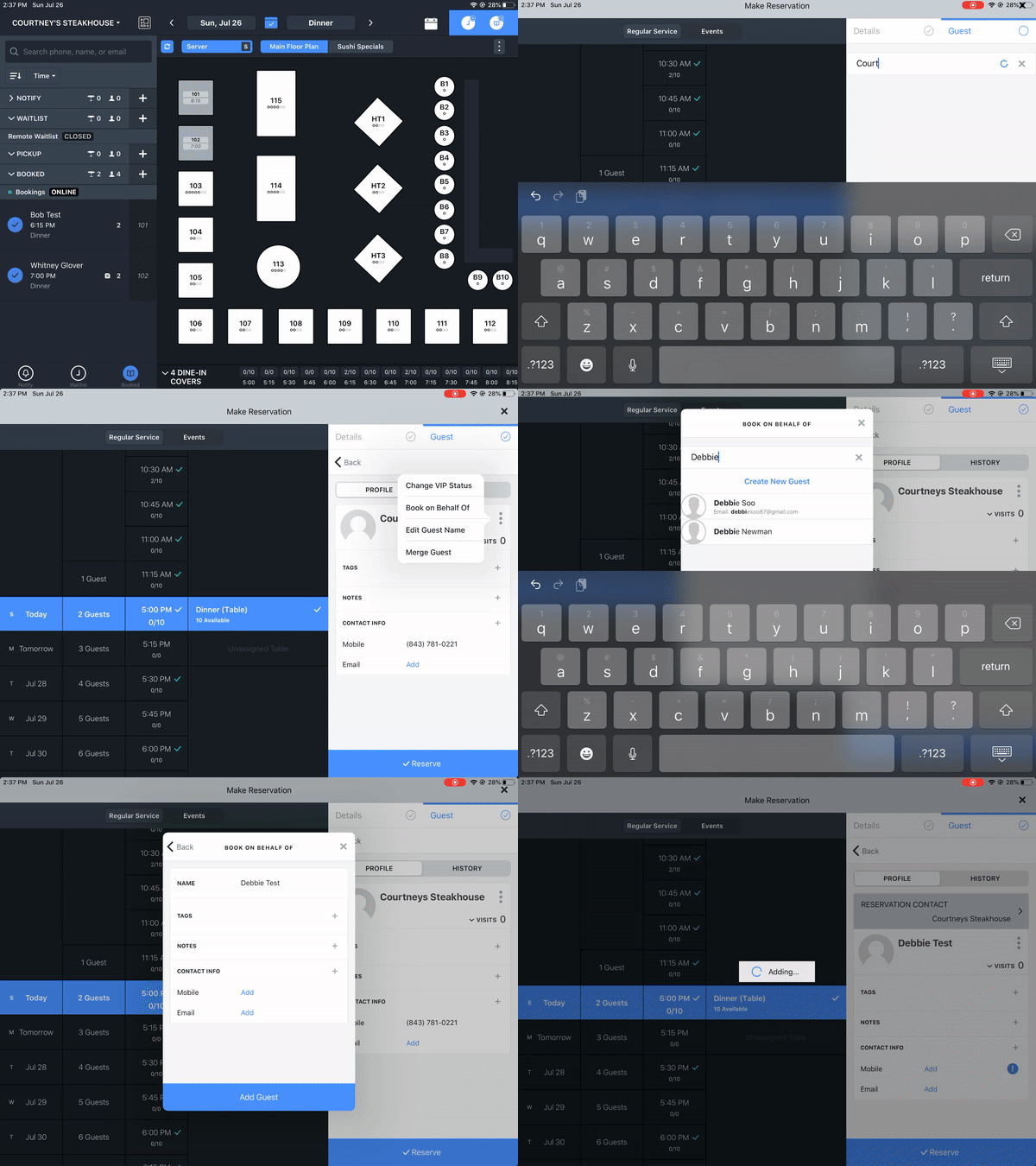
5. Enter the avvail.id email address from your Avvail dashboard in the email field.
You do not need to enter an individual guest phone number.
6. Finalize the reservation.
Confirm details are correct and complete the booking by tapping "Reserve." The reservation will display the actual guest's name, with the reservation contact listed as Avvail.
Make sure to accept the reservation in your Avvail dashboard after adding it to Resy. For more information on accepting reservations, refer to this support article.
For more information, reference Resy's Help Center article on this topic.