---
title: Adding blackout dates
description: How to add a blackout date to Avvail platform to prevent reservations from being booked on days the restaurant is closed.
---
[Skip to content](https://avvail.com/support/adding-blackout-dates#main-content)
English
Show submenu for translations

Open main navigation
Close main navigation
- English
Show submenu for translations
- Contact us
Contact us
How can we help you?
- There are no suggestions because the search field is empty.
1. [Restaurant Resource Center](https://avvail.com/support?hsLang=en)
2. [Account Settings](https://avvail.com/support/account-settings?hsLang=en)
# Adding blackout dates
## Add dates when your venue is unavailable for reservations.
To prevent reservations during private events or on high-demand holidays, you can make booking unavailable by adding a blackout date. We recommend setting blackout dates at least 30 days in advance to reduce the likelihood of unintended reservations.
NOTE: We ask that you do not add blackout dates on dates you anticipate high volume. Instead, we suggest setting aside a few seats from your inventory for Avvail reservations on these dates ahead of time.
#### STEPS TO ADD A BLACKOUT DATE:
**1. Navigate to the Availability page in the [Settings](https://dashboard.avvail.com/settings) tab of your dashboard.**
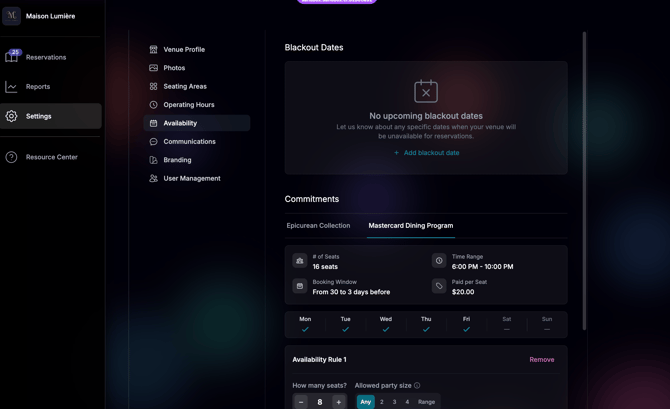
**2. Click "+ Add blackout date" and select the date you would like to black out and add a brief description.**
**3. Click "Save" in the bottom right corner of the screen.**
- [Account Settings](https://avvail.com/support/account-settings?hsLang=en)
- [Managing Reservations](https://avvail.com/support/managing-reservations?hsLang=en)
- [Reporting](https://avvail.com/support/reporting?hsLang=en)
- [TMS Setup](https://avvail.com/support/tms-setup?hsLang=en#main-content)
- [OpenTable](https://avvail.com/support/tms-setup?hsLang=en#opentable)
- [Resy](https://avvail.com/support/tms-setup?hsLang=en#resy)
- [SevenRooms](https://avvail.com/support/tms-setup?hsLang=en#sevenrooms)
- [FAQs](https://avvail.com/support/faqs?hsLang=en#main-content)
- [Terms of Agreement](https://avvail.com/support/faqs?hsLang=en#terms-of-agreement)
- [Cancellations & No Shows](https://avvail.com/support/faqs?hsLang=en#cancellations-no-shows)
[](https://avvail.com?hsLang=en)
[mailto:email@email.com](mailto:email@email.com)
Copyright © 2025, Guest.Tech